Learning development: Supporting students to be mindful

Since my initial introduction to mindfulness through Ruby Wax’s (2016) A Mindfulness Guide for the Frazzled, I’ve been meaning to reflect on mindfulness in the context of learning development. I didn’t quite get around to it. However, the publication of Cottrell’s (2018) Mindfulness for studentsfinally pushed this back onto my agenda and here I am blogging today.

Cottrell describes mindfulness as ‘being fully present in the moment’. This is framed as a pathway to greater self-acceptance and self-awareness.  Mindfulness is a hot topic at the moment. There are dozens of books on mindfulness (see: Waterstones) and even the NHS has pages on Mindfulness to promote wellbeing. Is this study-focused volume of use, or is it jumping on the bandwagon?

BrainA quick answer here – a bandwagon it may be, but there is a reason behind it. While it is cliche to say, ‘modern life’ is hectic and full of distractions. This is highly problematic when it comes to learning, especially in the self-directed learning context of higher education. Technology, social media and other student activities are all in constant competition with the need to study. While any form of study supports the long-term goals behind graduation, instant gratification is difficult to avoid. Here is where mindfulness may come in.

Mindfulness is often seen as an antidote to anxiety and stress, but more importantly, it can help with a number of common student woes such as problems concentrating, issues with maintaining attention or coping with difficult situations. I think learning developers often witness these issues and address them by supporting students to manage their own learning and time, to become self-directed learners and by encouraging the use of self-reflection. While certain aspects of mindfulness may come into these activities, they are often framed under the guise of study skills. I am not saying this is a bad thing, but there may be benefits to explicitly acknowledging mindfulness and encouraging its use.

Mindfulness in learning development

This needs to be applied carefully. Learning Developers are not life coaches or therapists – but we are there to help with learning and study. While we won’t be leading students through meditation, there are certainly some aspects of learning where mindfulness can be applied.

Here are a few possibilities that come to mind:

  1. Increased awareness of learning pitfalls. Helping students reflect on their own study practices can help them identify common distractions, lapses of attention and forms of procrastination.
  2. Develop a mindful approach to study. The ultimate goal is to help students develop a positive and enjoyable attitude, often gained through increasing their self-awareness of how they see study.
  3. Embed self-care into study. Students cannot be effective in their learning if they are stressed, tired or not looking after themselves. Good habits and time management are essential here.
  4. Contextualising feedback. Helping students look beyond immediate reactions to tutor feedback and helping them reflect on learning points and future applications.
  5. Utilise as a coping mechanism for stress and revision. While it won’t work for all students, there are applications for mindfulness in the support of exam readiness and stress busting.

I don’t think anything on this list falls outside of learning development. For this reason, I think there may be space to bring in the concept of mindfulness into our work. This may even have some advantages. A lot of the above is currently badged under self-reflection, but this is occasionally seen negatively by students. Sometimes self-reflection is an area they are assessed on, and so it is too closely associated with assignments. Sometimes it is because students hail from disciplines not traditionally associated with reflection and so it is seen as an unnecessary skill. Perhaps ‘mindfulness’ will be an easier approach to stomach? Yes – self-reflection is an element of this, but at least it isn’t the leading idea. Maybe mindfulness has some element of being on-trend?

There does, of course, have to be a distinct boundary in our use of mindfulness. Mindfulness can be (and is more traditionally) applied to wider aspects of life that study alone. While these are outside of the learning developer remit for most, the points above show there is certainly a lot of stuff that we can pick up.

Stacked Pebbles. Kinda Zen


References

Cottrell, S. (2018) Mindfulness for Students. Red Globe Press.

Wax, R. (2016) A Mindfulness Guide for the Frazzled. Penguin Life.


Image 1 (CC0) and image 2 (CC0)

Happy (Professional) Developments! CeLP | MIEE | NCE

Over the last few months I have had a number of amazing opportunities to learn new skills, demonstrate technical competencies and reflect on my own professional development. All of this hard work has led to the following recognitions:

  • Certified Leading Practitioner (CeLP) (ALDinHE)
  • Microsoft Innovative Education Expert 2018-19 (MIEE) (Microsoft)
  • NVivo 12 Certified Expert (QSR)

Each of these means an awful lot to me, and reflects a lot of hard work and commitment over the last few years.


Certified Leading Practitioner (CeLP)

CeLP status is awarded by the Association of Learning Development in Higher Education (ALDinHE, 2018). Professional recognition is a new venture for ALDinHE, launched at the 2018 annual conference. The scheme offers two levels of recognition, certified practitioner (CeP) and certified leading practitioner (CeLP), helping to recognise learning development as a distinct profession (Briggs, 2018).

I am truly honoured to have been recognised as a Certified Leading Practitioner, and for the ALDinHE community which provides such an excellent forum for us to share practice and ideas. I cannot wait to see how this recognition scheme grows and how ALDinHE continues to evolve as a professional body.

If you work within learning development in higher education, I highly recommend the CeP/CeLP professional recognition. Similar to HEA fellowship, it provides a valuable opportunity to reflect on your practice. What makes ALDinHE’s scheme particularly valuable is its grounding within learning development, making it the most relevant scheme for professionals working in this area.

Microsoft Innovative Education Expert 2018-19

Microsoft Innovative Educator Expert 2018-19I am happy to share that I am returning as a MIEE for 2018-19 and Trainer, making this my second year in the programme. I am particularly excited to be joined this year by Sue Watling, who alongside Joel Mills places at least three of us in Hull. The MIEE program provides excellent opportunities to connect with peers, share ideas and help other educators.

As Microsoft continue to develop stunning new features and tools that continue to make technology more open and accessible, I could not be more proud to be an MIEE. You can check out my profile on the Microsoft Educator Community, but more importantly have a look at the excellent courses and resources.

NVivo 12 Certified Expert

I am incredibly proud to be recognised as a NVivo 12 Certified Expert. This level of recognition reflects a long journey for me, starting with my first use of NVivo in 2011. Since then I have taught hundreds of students, created dozens of NVivo projects and ingrained NVivo into a variety of research. To gain expert status I was required to undertaken further learning, sit a multiple choice exam and take three, two-hour exams. I am so proud of myself for getting through all of this (including further assessment to move from NVivo 11 to 12).

If you are an experienced NVivo user, I highly recommended the certification program. It is an excellent way to build your skills and recognise your achievements.


I am aware that this whole post was a little self-indulgent, but after all this work I had to do a little something to mark all of these achievements. My next step is to go for my Senior Fellowship of the HEA, building on my current Fellowship level. This one is going to take a lot of work, but I have already made a fair start on the application. Wish me luck!

Designing for Diverse Learners

This post will detail the Designing for Diverse Learners Project that I am undertaking with my colleague Sue Watling from Learning and Teaching Enhancement, University of Hull. This post is published on both of our blogs, and you can check out Sue’s blog Digital Academic.

The Home Office launched an excellent poster series to highlight practices for developing content for users falling into one of the following six categories:

  • low vision,
  • D/deaf and hard of hearing
  • Dyslexia,
  • motor disabilities,
  • users on the autistic spectrum,
  • users of screen readers (visual issues/blindness).

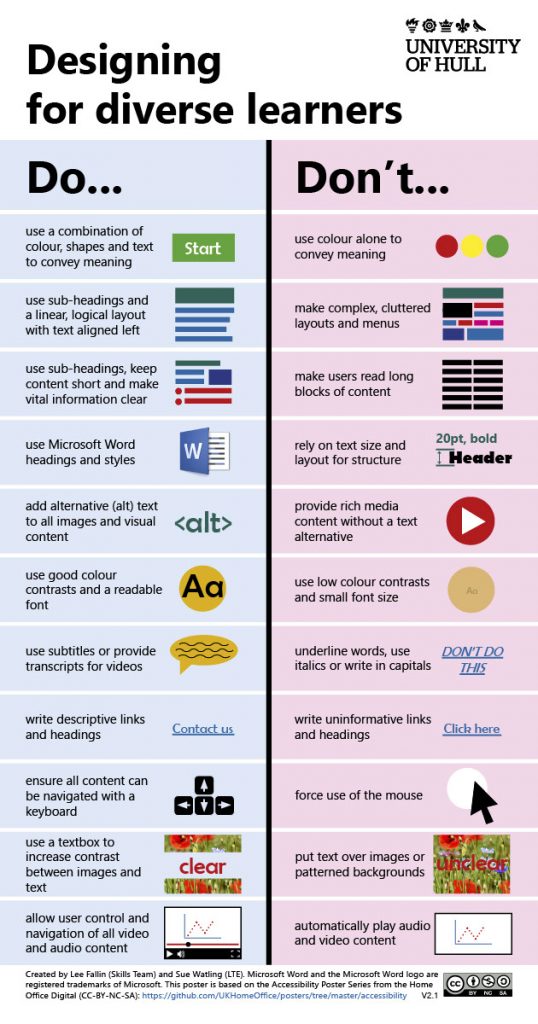
We we really impressed by these posters, but also overwhelmed with how we can support educators to use them in practice. For this reason, we worked to develop our Designing for Diverse Learners poster, combining the essential practices for all of the above. The aim of this document was not to target any one group of learners, but to develop an outline of practices that follow the principles of universal design where changes for some benefit the vast majority of learners.

The Poster: Designing for Diverse Learners

We have made this poster available in two formats, the image below and a printable PDF. For best results, print your poster on A3 paper (portrait orientation) and trim the white paper to the sides.

This poster outlines some best practice guidelines for learning design

Why ‘diverse learners’?

The idea of ‘diverse learners’ is really important to the both of us. The practices outlined in our poster will benefit every learner, not just those who many require specific adjustments. The reason we are able to do this is that in applying the principles from the above posters to the educational context, we are able to look at them for the specific purpose of designing digital learning materials and opportunities.

One of the reasons for our initial focus on digital resources is our institutional context at the University of Hull where the majority of resources will be access via the institutional VLE, Canvas. The University of Hull has a set of ‘expected use of Canvas’ criteria which include the following:

Staff should ensure that all digital content supporting learning and teaching e.g. text, images and multimedia, follows inclusive practice guidelines.

Our poster does not claim to support every single learner or requirement an educator may come across, but we are certain that resources developed along these principles will meet the vast majority of needs. We are also keen to frame this as a working document. We are keen to get as much feedback as we can to help us make this resource event better. We’ve already had some feedback about including some text line spacing and would welcome any further ideas you all have.

Future developments

As a community, we can continue to develop this resource and make it even better. We welcome input from both educators and learners as to how we can make this any better. We have set-up a Tricider to help collect feedback on the poster and to enable to community to vote on individual ideas. If you have not used Tricider before, it is very easy to contribute. Simple visit our Tricider and either ‘add an idea’ or vote on the ideas of others. You can also place comments on Tricider or use the comment area on this blog post if your prefer.

Using academic social networks for literature searching

This ‘perspective post’ is going to look at using academic social networks for literature searching.

Now I want to make it very clear I am not advocating replacing a proper academic search strategy – with a social network. That’s a terrible idea! The University of Hull Library subscribes to some fantastic resources and you can check them out via your Subject LibGuide.

That caveat aside, I can now say that networks like Academia.edu and Researchgate.net can be very useful for collecting literature. I think they have two very specific purposes in any literature search:

  1. Expand your search beyond academic databases
  2. Find papers that you have already identified as useful, but we do not subscribe to

Expanding your search

The University Library has a fantastic guide on How to plan and conduct your searches. This is definitely the place to start any search, focusing your search on the resources identified in your Subject LibGuide.

If you still need more evidence, want to go beyond this kind of search or find more literature. That is where the networks come in. On both Academia.edu and Researchgate.net – you can search for research papers. This is never as precise as an academic database and it doesn’t have the same level of configuration –  but it will potentially give you access to thousands of articles.

One strength of Academia.edu and Researchgate.net, is that it is what I like to think of as a ‘human-curated’. I’ve struggled to find many topics through traditional databases, but come across a trove of papers on networks. The tagging and conversations on these networks allow a different kind of search to the title/keyword/abstract search of most databases.

Academia.edu and Researchgate.net will give you very different results to a database. Often results are lots of peer-reviewed papers, many with full-text available. Where text is not available, you can always ask the author for a copy and I tend to get a 50% success rate. This isn’t as immediate as library subscriptions, but is useful to expand the search. Results are however not always peer-reviewed and reliable. You may find unusable, non-peer-reviewed papers or essays. While you cannot cite these papers, their bibliographies are a treasure trove of potentially useful papers that you may not of already found.

Finding the full-text of papers you have already identified

The University Library subscribes to a large range of journals. Often, if you can’t find the full-text, it may be that you are not searching in the right place. The Library Catalogue will point you in the right direction (search for the journal title – NOT article title). If you can’t find the journal through the catalog, University of Hull staff and students are eligible to request an inter-library loan. This is an excellent service – but before using it, it is often worthwhile checking Academia.edu and Researchgate.net for the papers. Even if the papers are not there – the author may be and you can get in touch with them. This may get you the paper quicker, and lets you save ILLs for when you really need them.

Microsoft Innovative Educator Expert (MIEE) Spotlight

I had the pleasure of being yesterday’s Microsoft Innovative Educator Expert (MIEE) Spotlight. This MIEE spotlight is a nice blog that Microsoft uses to highlight the work of MIEEs around the country. On reading the spotlight post, it made me realise I’ve yet to post my portfolio on my own blog. and as such, I’ve just created this quick blog post to share my portfolio from last year. I’d also like to extend thanks to @misskmgriffin for the summary of my portfolio in the spotlight above.


I also realise it has been a while since I’ve provided an update on what I am up to with Microsoft in education, so stay tuned for some more updates in the new year!

The bitesized EdD: Finding slots of time for a professional doctorate

Over the last few weeks I’ve been able to find more time for EdD writing (and reading). This hasn’t been large chunks of time, but just making better use of the small pieces of time I would usually waste.

It is easy to fall into the trap of feeling a doctorate needs whole days and afternoons of time. Yes. This helps. But actually, small bits of time really add up. Finding a couple of fifteen or twenty minute windows per day easily leads to a few hours over the week. This is where I’m finding my time.

I’ve been able to get a good twenty minutes on a fair few mornings to squeeze in some work. Instead of waiting for weekends or a whole free evening, I’ve found additional EdD time by squeezing in an extra hour or two on a few week nights. This hasn’t really impacted my personal life as I’ve fit this in after my fiancé goes to bed.

Being able to pick up work in small chunks like this requires a lot of discipline. It’s hard to put the work down after a few minutes. But when you have only twenty minutes – that is what you have to do! It also means you need to jump into productivity quickly and get yourself used to picking up where you left off quickly. This also requires discipline and practice.

I find technology really helps with this. Microsoft Word handily tells me where I left off. One Drive allows me to pick up work on any Mac, computer or iPad tablet. OneNote keeps my notes available everywhere. EndNote lets me take my library with me. All of these tools together allow me to quickly pick up bits of work. Quite often, I find OneNote is the largest enabler. I can quickly pick up some reading and make some notes or record some thoughts.

Track changes and Microsoft Word comments are also a great way to keep up with where I left off. One thing I’ve yet to try is a recommendation for @JaxBartram, she recommended always ending mid sentence. The idea being it is always easier to pick up work mid-sentence than it is to start afresh.

One one way to see if that works!

Home Office

Digital Transformation – responding to the challenge in academic libraries (Northern Collaboration 2017)

Today I attended my first Northern Collaboration Conference, with the added pleasure of delivering a workshop with Mike Ewen. This conference had the added bonus of being relevant for both work purposes and for my EdD research. The conference theme, Digital Transformation – responding to the challenge in academic libraries certainly aligned across work and research interests, with a good mix of educational technology thrown into the mix.

Digital transformation is a very topical theme for academic libraries, with the conference website presenting the following definition Brian Solis

“the realignment of, or new investment in, technology and business models to more effectively engage digital customers at every touchpoint in the customer experience lifecycle.”

In the library context, this definition really highlights the role of technology and related business models in the engagement of students throughout their student journey. This of course is very topical, and something my thesis touched on in guise of space. The conference theme and its constituent parts were really well brought together and contextualised in the closing keynote from Anne Horn (Director of Library Services, University of Sheffield). Anne highlighted how libraries are embodying such digital transformation(s) through:

  • service enhancement
  • energising our teaching
  • enriching library spaces
  • developing staff digital capabilities
  • utilising new digital processes, channels and platforms
  • pioneering new technology.

In her keynote, I particularly enjoyed the speculation on new technological megatrends and their potential impact on the library sector. With augmented reality, the internet of things, automation, robotics, personal assistants, big data, data visualisation, artificial intelligence, information exchange, makerspaces and wearables all featuring in the discussion. It could certainly be an interesting future for libraries. A great deal of this will depend what technological hypes settle into the mainstream edtech.

I think one thing we can be confident in, is that libraries will be still here (or, at least for some time yet!). Anne gave an interesting angle to the argument. As often said, there was conjecture that libraries would die as paper books and journals diminished in a world of eBooks and eReaders. This did not happen – and will not happen anytime soon. It was here that Anne’s argument got interesting. We are in a world where Uber can be a global leader in taxi transport provision – yet it does not own a single car. Airbnb is a leading hotelier without owning a single premises. So it has to be suggested. Can libraries not continue to exist in a world where they may not own the content (particularly with the vast quantity available freely on the internet)? This begs the question “What is worth owning… the platform or the underlying asset” (Schwab, 2017). Libraries are perhaps another industry that presents a platform more powerful than the assets it provides access to.

I strongly believe that as long as libraries continue to provide compelling services and spaces (both physical and online), they will always have a popular and needed platform, even if it does not directly own informational assets.

I will leave my conference discussion here for now. I would just like to add that I thoroughly enjoyed the parallel sessions that I attended throughout the day from the University of York, Sheffield Hallam, University of Bolton, Open University and University of Sheffield. All were very thought provoking and I believe they will feed into my wider digital literacy and general skills provision work, particularly online. Thanks to the organisers for a wonderful conference.

p.s. Mike and I intend to collaborate on a blog soon to review our session in a bit more detail.

Microsoft Innovative Educator Expert 2017-2018


Monday this week I had the great pleasure of receiving an email from Microsoft to congratulate me on being selected as a Microsoft Innovative Educator Expert (MIEE) for 2017-2018. This was a wonderful surprise, following my application submission earlier this year. The application process involved putting together a PowerPoint Mix or Sway to overview my work. I chose to create a small portfolio in Sway which was an excellent opportunity to reflect on the last academic year. Now I am part of the MIEE programme I look forward to continuing to model the use of Microsoft technologies for learning and teaching. More importantly, I look forward to training and supporting colleagues in their own use of Microsoft technology for learning and teaching.

The year ahead

The MIEE status stays with me for a year and over this time I’ve been thinking about what I want to work on. Like any other commitment I take, I took to Twitter to outline my plans for the year:

As outlined in my tweet, I have three areas I want to work on and in this blog I’ll add a fourth – my own CPD.

Sways and Mixes

I think Sways and Mixes are fantastic educational tools. I especially love how I can quickly create a Mix in PowerPoint. While I can use more complicated tools, they take valuable time. Time I don’t have. For Sway – I love the dynamic and responsive nature. They work really well for content heavy pages that need to be accessible on any size of screen. The ability to set image focus points always ensures the most important elements of any diagram are preserved no matter what device someone is on. I am looking forward to getting some Mixes and Sways online.

Support colleagues with digital literacy and Microsoft 365

Over the last couple of years I’ve been doing a lot of work on digital literacy. My work over the last few months with Microsoft Office 365 and a whole range of Microsoft tools and apps (Learning Tools, Sway, Office Lens, Snip, PowerPoint Mix) has brought new perspectives to this work. Having built my own expertise through practice, I’m now looking forward to supporting colleagues developing their use of Microsoft educational tools, apps and Microsoft Office too. I’m also keen to update some of my existing resources with the latest tech solutions.

Promoting OneNote

OneNote has long been a component of Microsoft Office. It is however, often in the shadow of Word, Excel and PowerPoint. I think it is one of the most undervalued aspects of the office suite and I always love introducing users to it. Often, students have OneNote installed on their computer but have never even opened it. I want to try and promote it more within my own institution. I think OneNote combined with Office Lens is the perfect solution to all a students note taking needs! Additional aspects of this including further experimentation with Class Notebooks, and I look forward to seeing how they can replace some wikis I am currently using in the VLE.

CPD

Technology is always developing and I aim to keep myself up-to-date on any new tools Microsoft release, and any updates to existing tools. I’m also keen to continue developing my knowledge through the Microsoft Educator Community.